Foodhub for Business is now Touch2Success.

touch2success

Everything in Res Hub

Everything you need to run a busy restaurant

Seat faster, take bookings from every channel and cut no-shows. Tap any tile to jump straight to it.

01Floor & tables

See every table at a glance

One live view of the room that the whole team works from, on any device.

Live floor plan

Tap a table, see the night

Real-time table status across the room, so seating a party or merging tables takes a tap, not a conversation.

  • Instant availability for every tableTable status updates live, so the host always sees what is free, booked or seated.
  • Merge tables on the flySelect a table and merge it with another when a bigger party walks in.
  • Same view on every deviceStaff on iPad, tablet and phone all see the same floor, in sync.
Smart table allocation

The right table for every party

Res Hub suggests the best table for each booking, so you maximise covers and cut idle time.

  • Recommended table for every bookingA suggested table is ready the moment you add a reservation or walk-in.
  • Filter tables by zoneNarrow the picker to the area of the restaurant the guest prefers.
  • Better control during peak hoursAllocation stays quick and consistent when the room is at its busiest.

Floor plan editor

Lay out the room in minutes

Draw your restaurant as it really is and change it whenever you rearrange the floor.

  • Drag-and-drop layout setupAdd tables to the plan and place them where they sit in your room.
  • Resize and rotate tablesMatch each table's shape and angle to the real thing.
  • Update the plan any timeAdd or remove tables when your layout changes, with no rebuild.

02Bookings & waitlist

Take every booking, lose no covers

From your website widget to the walk-in waitlist, every guest lands in one place.

Reservations board

Find any booking in seconds

Every reservation for the day in a single view. Open a booking, change its time and save.

  • All of today's bookings at a glanceSee the whole service on one board instead of hunting through lists.
  • Edit in a few tapsChange a booking's time or details without leaving the board.
  • Track status through serviceFollow each booking from reservation through to seated and completed.

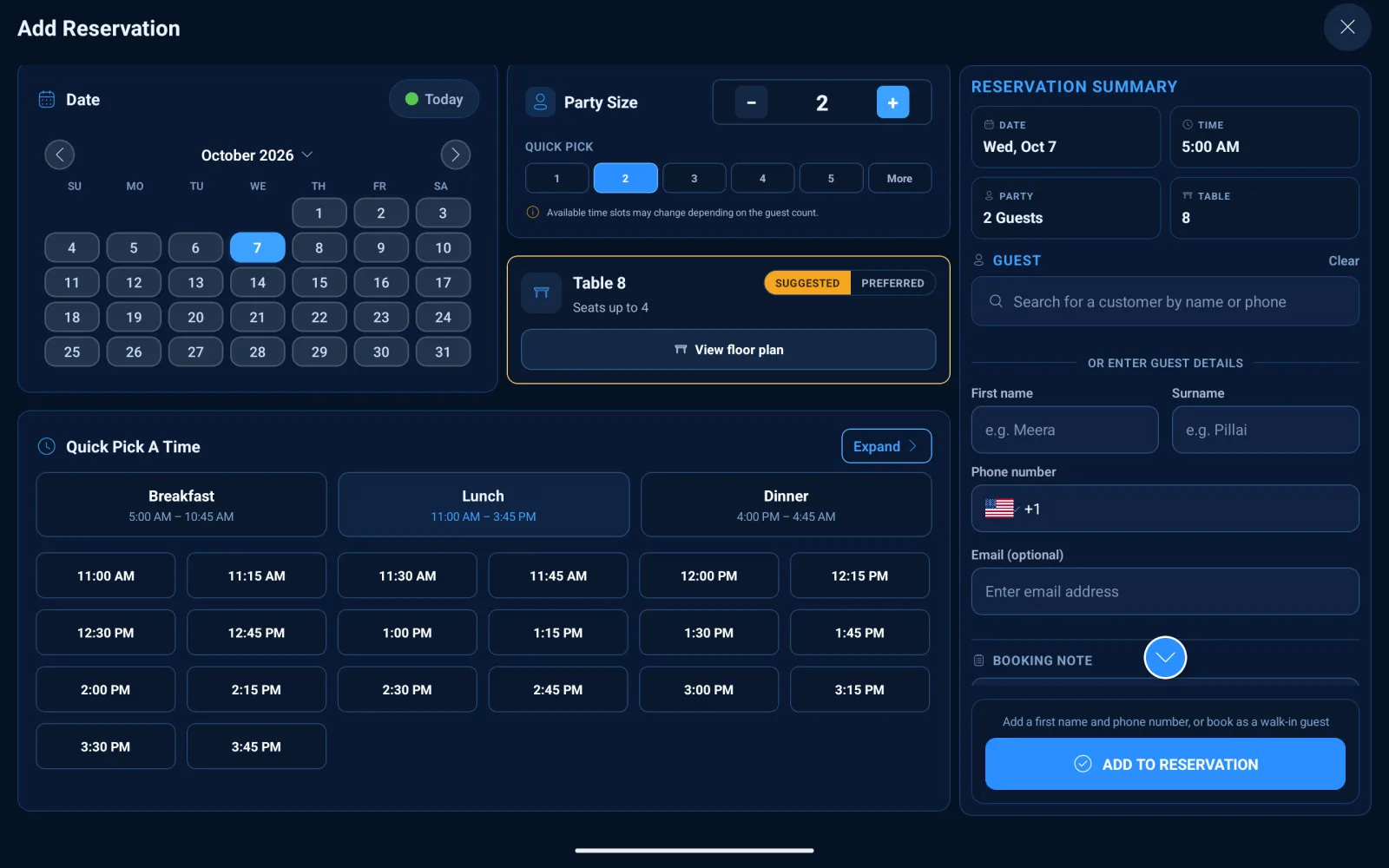
Add a reservation

Book a table in under a minute

Pick the date, party size and time slot and get a suggested table straight away.

  • Time slots shown by availabilityOnly the slots you can actually offer are shown for the chosen date and party size.
  • Suggested table on every bookingRes Hub proposes a table so you never have to guess.
  • Built for phone and walk-in bookingsQuick entry means the host can capture a booking without slowing down.
Res Hub add reservation screen with date, party size, time slots and suggested table

Smart waitlist

Turn walk-ins into covers

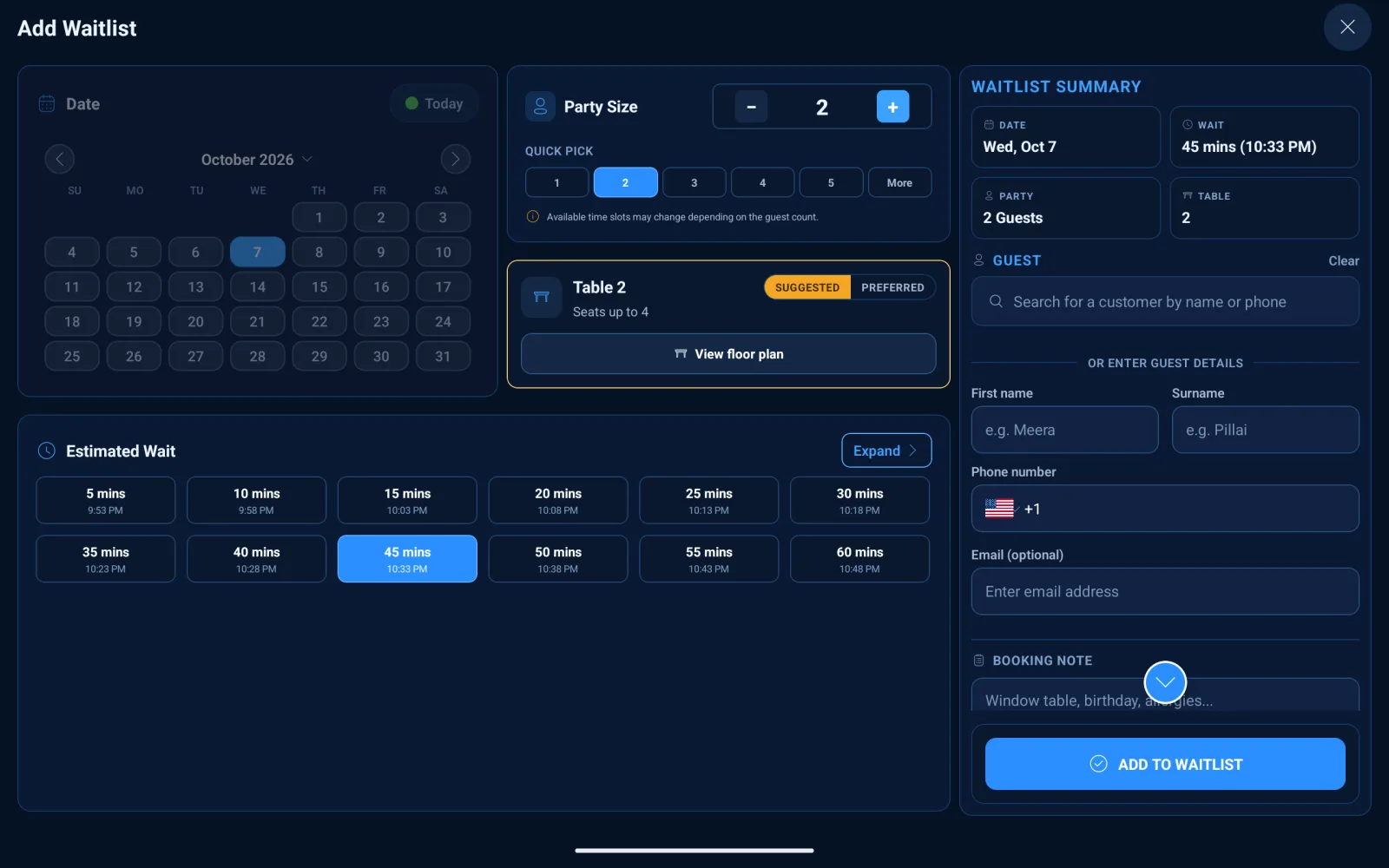
Add walk-ins with a quoted wait time and a suggested table, or let guests join themselves.

  • Quoted waits from 5 to 60 minutesGive every party a clear estimate when they join the list.
  • Suggested table ready for seatingWhen a table frees up, the next party has a table suggested.
  • QR code self-joinGuests scan your waitlist QR code to add themselves.
Res Hub add to waitlist screen

Booking requests

Approve requests in one tap

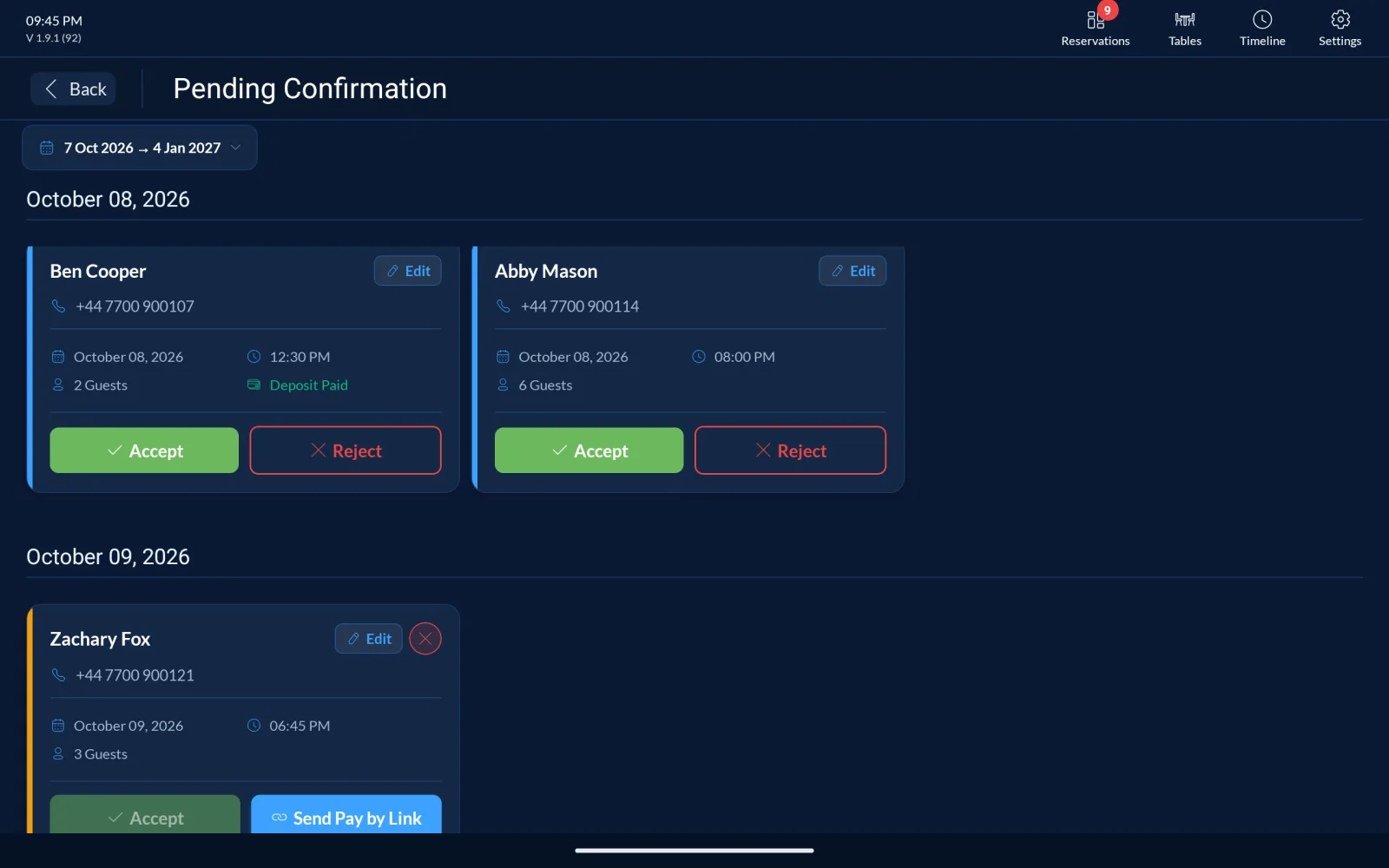
Review incoming requests by date and accept or reject them, with deposit status on every request.

  • Accept or reject in one tapReject with a reason so the guest knows why.
  • Deposit status on every requestSee at a glance which guests have already paid.
  • Send Pay by LinkCollect a deposit by sending the guest a payment link.
Res Hub pending booking requests awaiting confirmation

Booking slots

Decide when guests can book

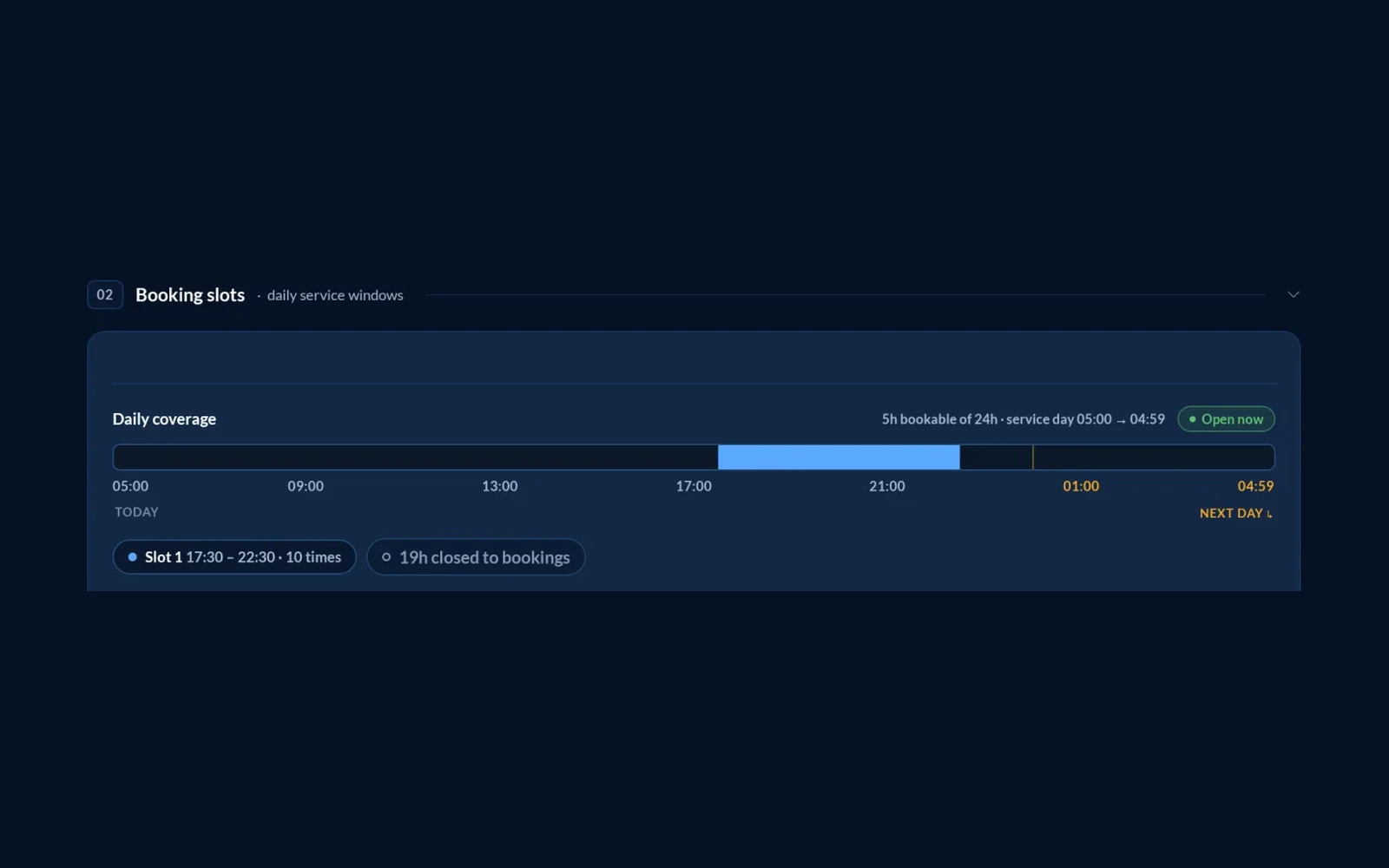
Set the daily service windows guests can book into, and see your coverage for the day at a glance.

  • Daily service windowsDefine the slots, each with its own opening and closing time.
  • Daily coverage at a glanceA timeline shows how many hours of the service day are bookable and which are closed.
  • Switch slots on or offOpen or close any slot with a toggle, without losing its settings.
Res Hub booking slots with a daily coverage timeline and slot toggles

Booking widget

Let guests book on your own website

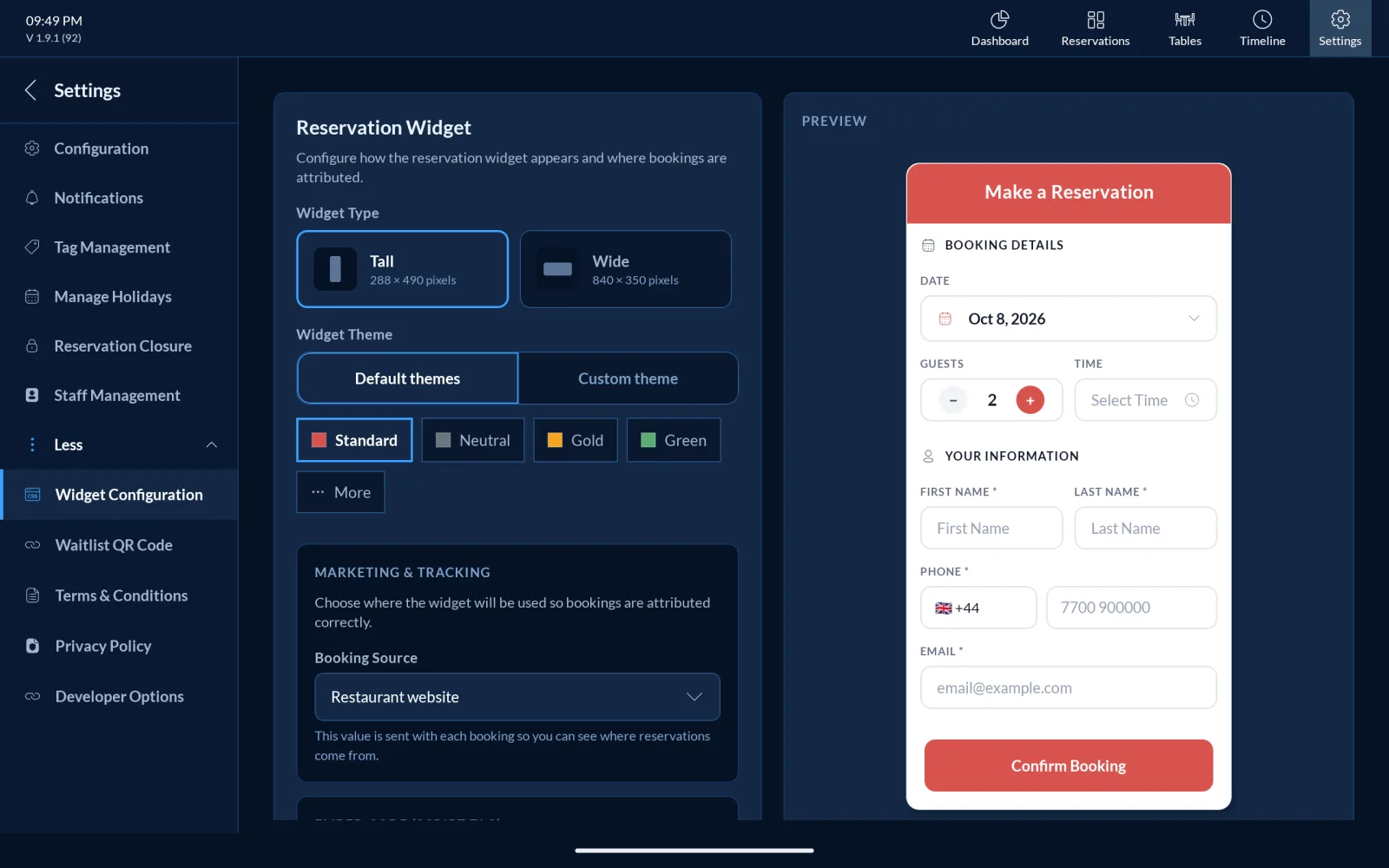
Add a reservation widget to your website that looks like your brand.

  • Tall or wide layoutsPick the widget shape that fits your page.
  • Default or custom themesMatch your brand colours and preview the result live.
  • Booking source trackingSee where your bookings are coming from.
Res Hub website booking widget

03Booking deposits

Secure every booking before they arrive

Take a deposit at booking, see who has paid, and let your no-show policy handle the rest.

Booking deposits

Protect every table from no-shows

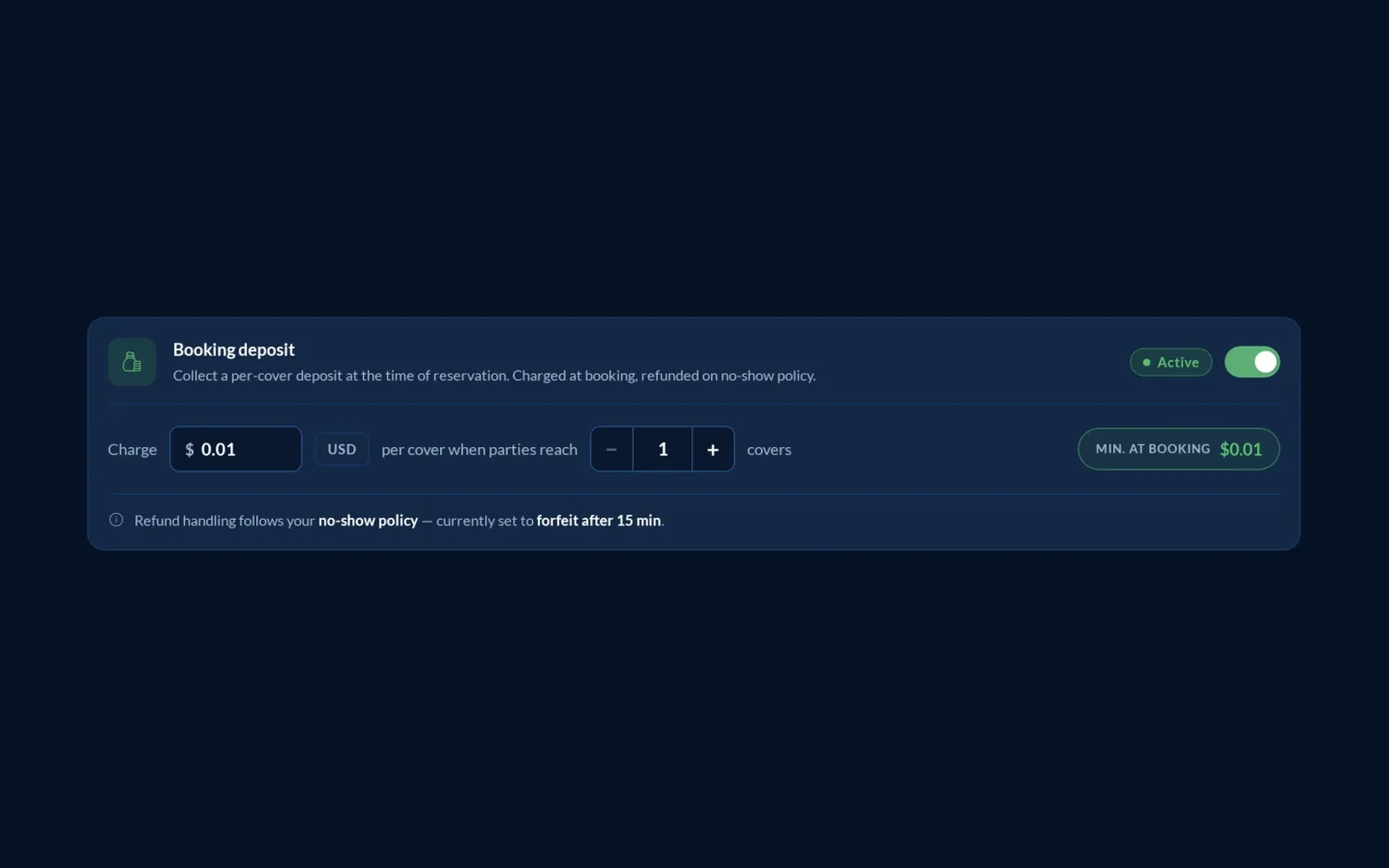
Collect a per-cover deposit when a guest books, and let your no-show policy decide what happens to it.

  • Per-cover deposit at bookingSet the amount charged per cover. It is collected at the time of reservation.
  • Only for the parties you chooseApply the deposit once a party reaches the number of covers you set.
  • Refunds follow your no-show policyRefund handling follows your no-show policy, for example forfeiting the deposit after 15 minutes.
  • On or off with one switchTurn booking deposits on whenever you need them and off when you don't.
Res Hub booking deposit settings with a per-cover charge, minimum party size and no-show refund policy

Deposit status & Pay by Link

See who has paid, and chase who hasn't

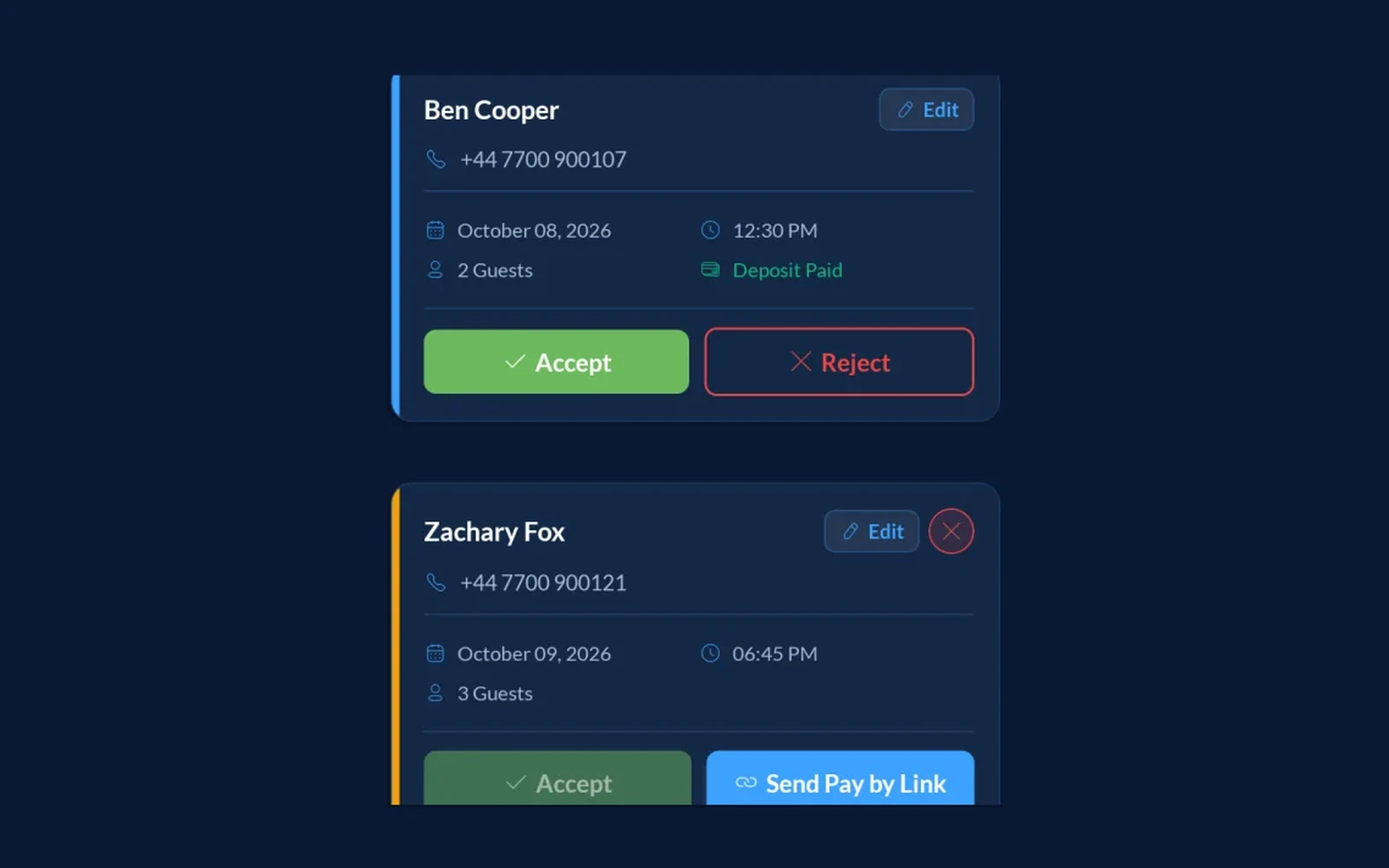
Every booking request shows whether the deposit has been paid, and you can send the guest a payment link straight from it.

  • Deposit Paid on every requestRequests with a paid deposit are labelled, so you know which tables are secure.
  • Send Pay by LinkRequests without a deposit get a Send Pay by Link button, to collect it from the guest.
  • Accept or reject in one tapReview each request by date and respond straight from the card.
Res Hub booking requests showing a Deposit Paid label and a Send Pay by Link button

04Guests

Know every guest by name

Turn bookings into relationships with a profile, tags, notes and a full history for each guest.

Guest profile

A profile for every guest

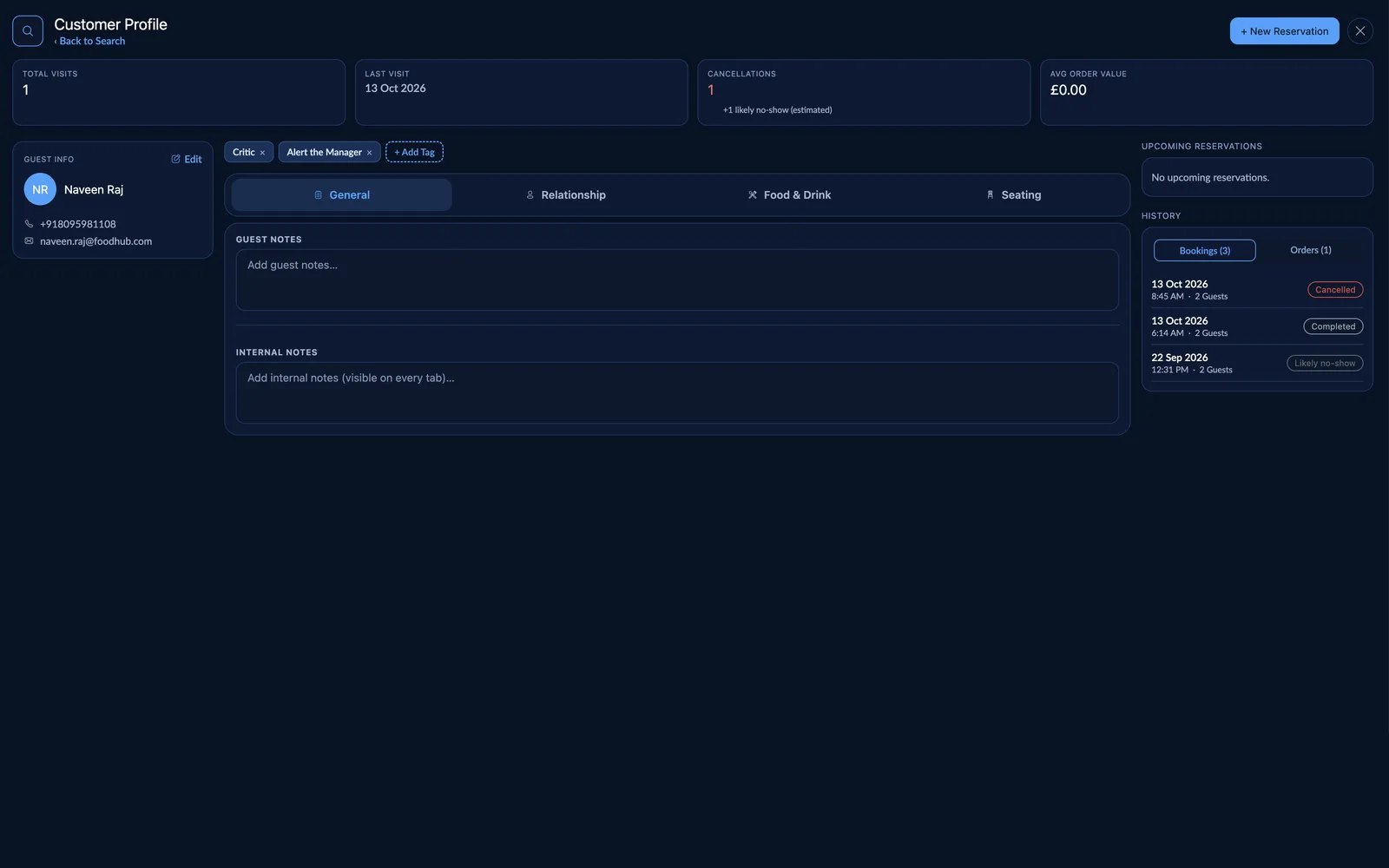
Contact details, visit stats and booking history for each guest on a single screen, with a new reservation one tap away.

  • Visit and spend stats at a glanceTotal visits, last visit, cancellations and average order value sit at the top of every profile.
  • Contact details in one placeName, phone and email are on the profile, and you can edit them any time.
  • Book from the profileStart a new reservation for the guest without leaving their record.
Res Hub customer profile with visit stats, guest tags, notes and booking history

Tags & notes

Remember what every guest likes

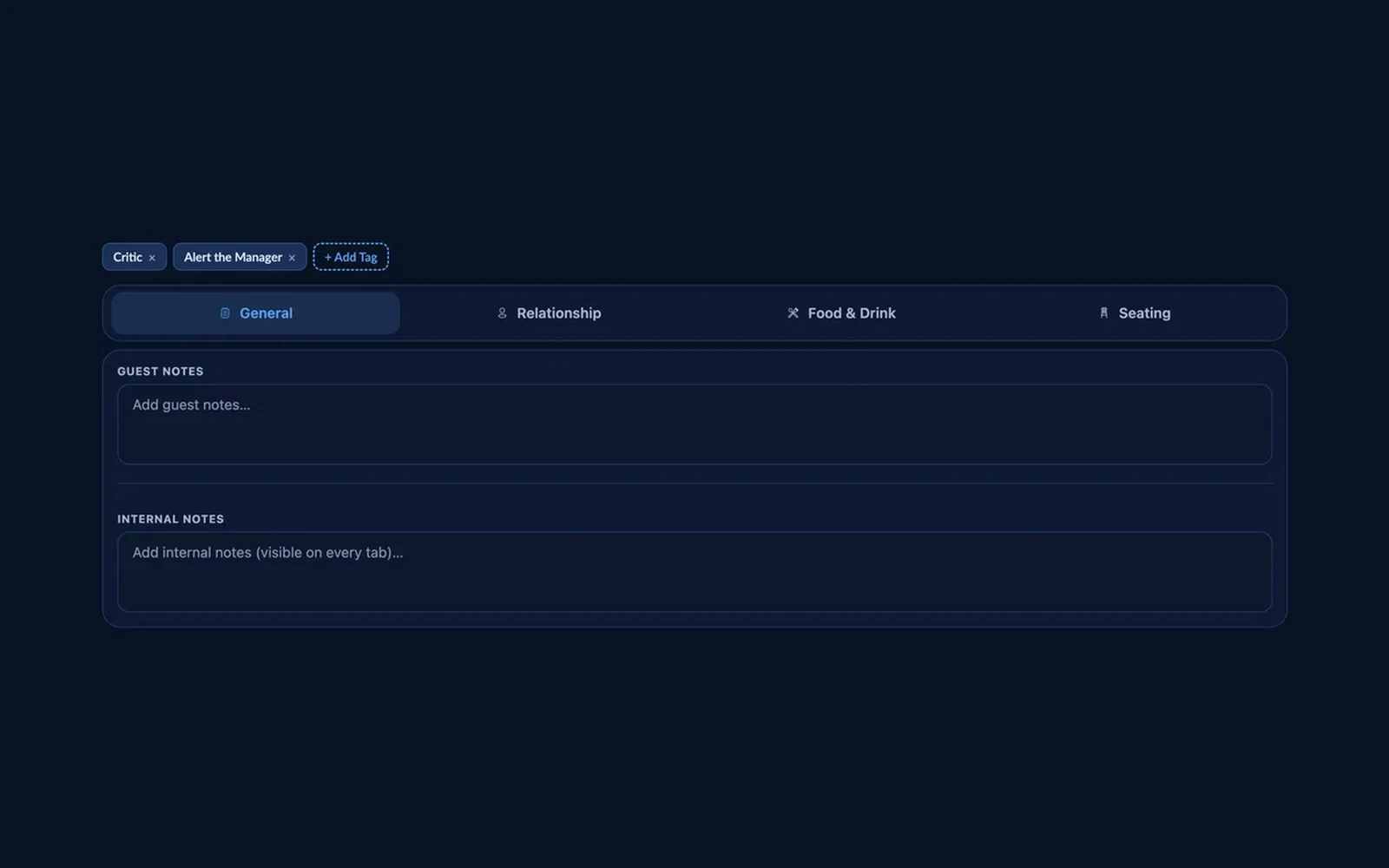
Tag your regulars and note their preferences, so any member of staff can personalise the visit.

  • Tags you createLabel guests with tags such as Critic or Alert the Manager, and add your own.
  • Notes by topicKeep general, relationship, food and drink, and seating notes on separate tabs.
  • Guest and internal notesWrite notes about the guest, plus internal notes that stay visible on every tab.
Res Hub guest tags and notes with General, Relationship, Food & Drink and Seating tabs

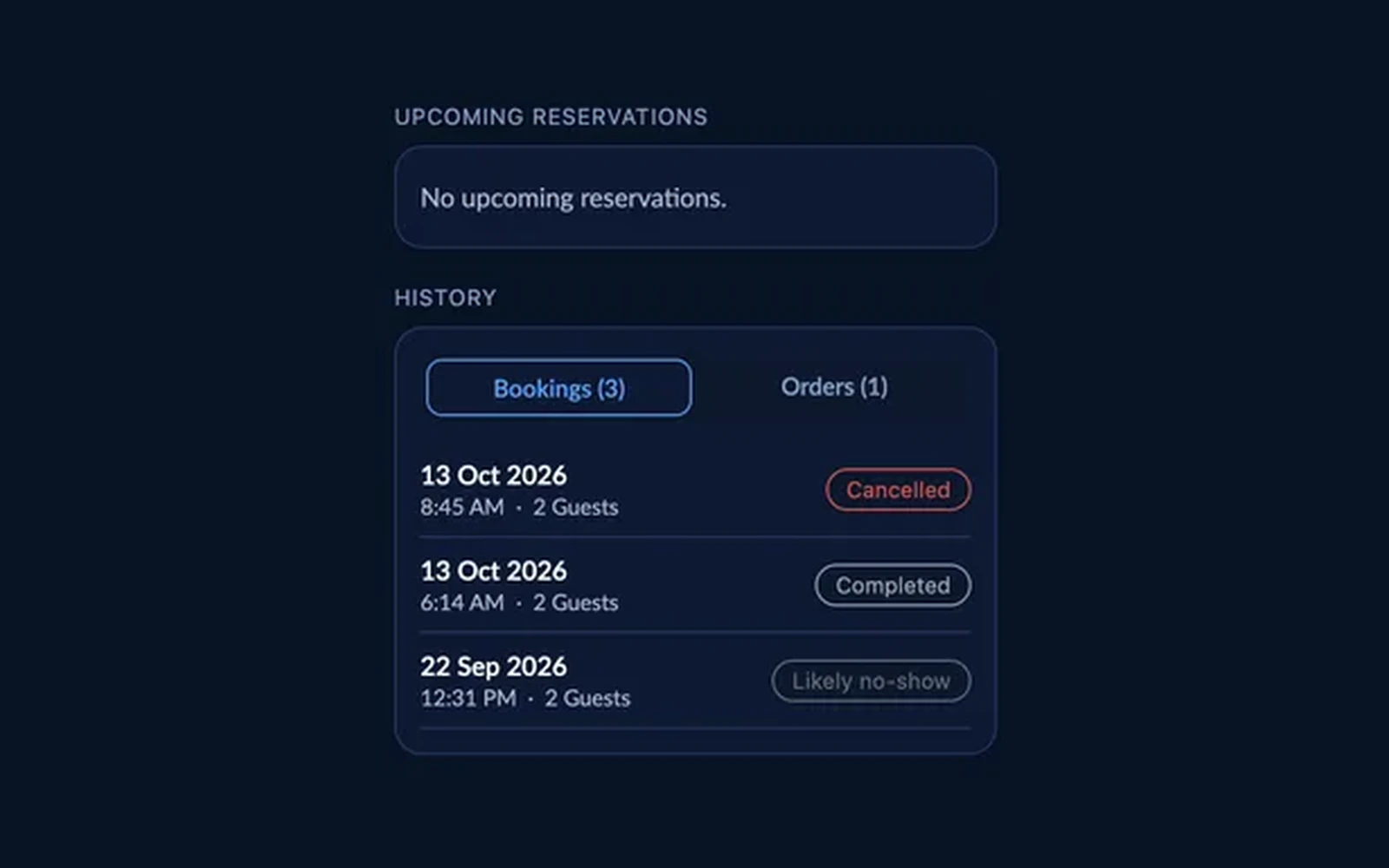
Booking history

See every visit before they arrive

A guest's upcoming reservations and full history, with a clear status on every booking.

  • Bookings and orders historySwitch between a guest's past bookings and their orders.
  • Clear status on every bookingCompleted, cancelled and likely no-show bookings are labelled, with the date, time and party size.
  • Spot no-show risk earlyCancellations are counted on the profile, with an estimate of likely no-shows alongside.
Res Hub guest history showing upcoming reservations and bookings marked cancelled, completed and likely no-show

05Insights & planning

See the week before it happens

Plan staffing and spot your busiest hours with live data from the floor.

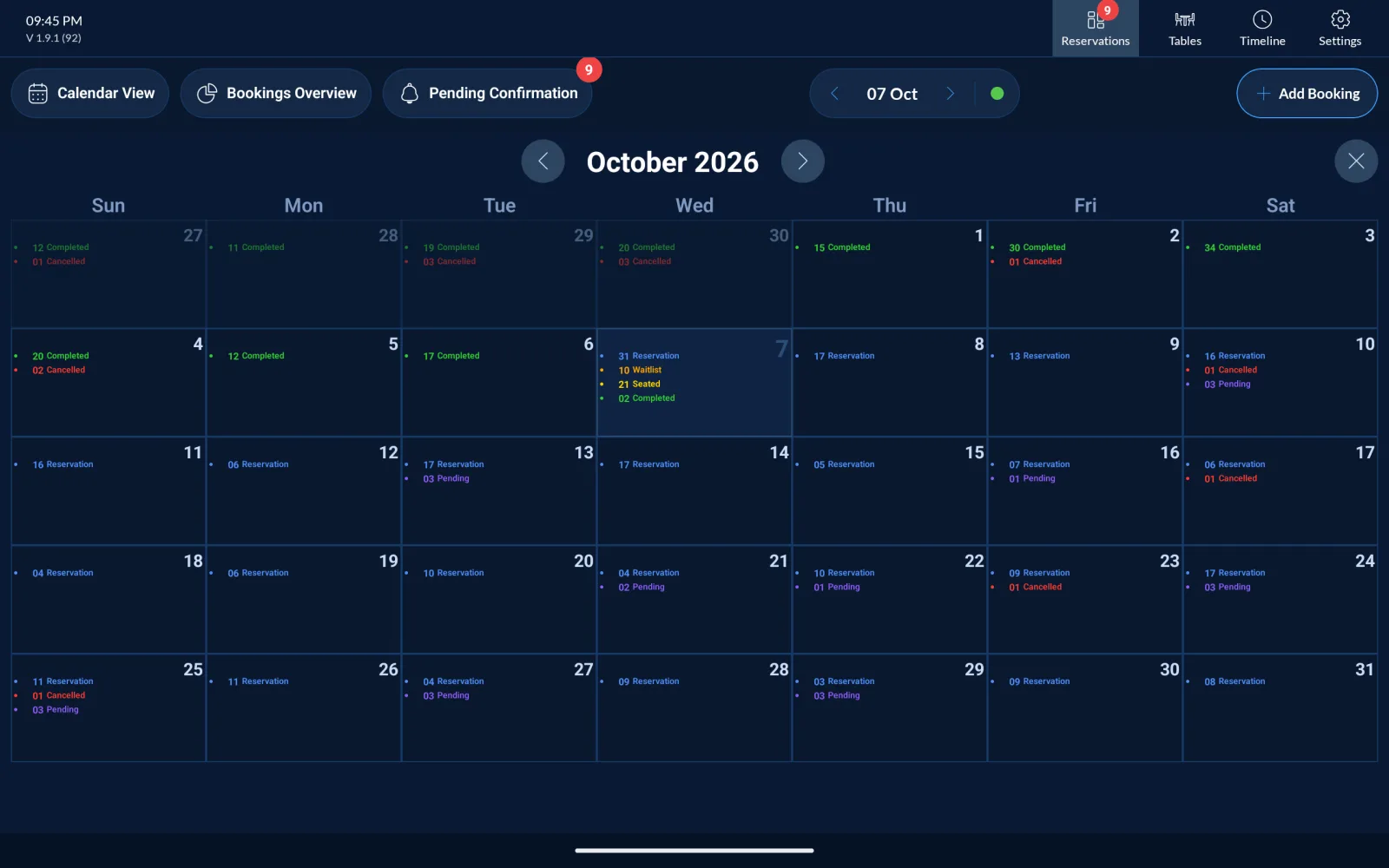
Calendar view

See the whole month ahead

A month calendar of every booking status, so you can plan staffing early.

  • Daily booking counts by statusReservations, waitlist, seated, completed, cancelled and pending, for every day.
  • Pending requests flagged per dayKnow which days still need a decision.
  • Spot busy days earlyPlan rotas before the rush, not during it.
Res Hub month calendar view

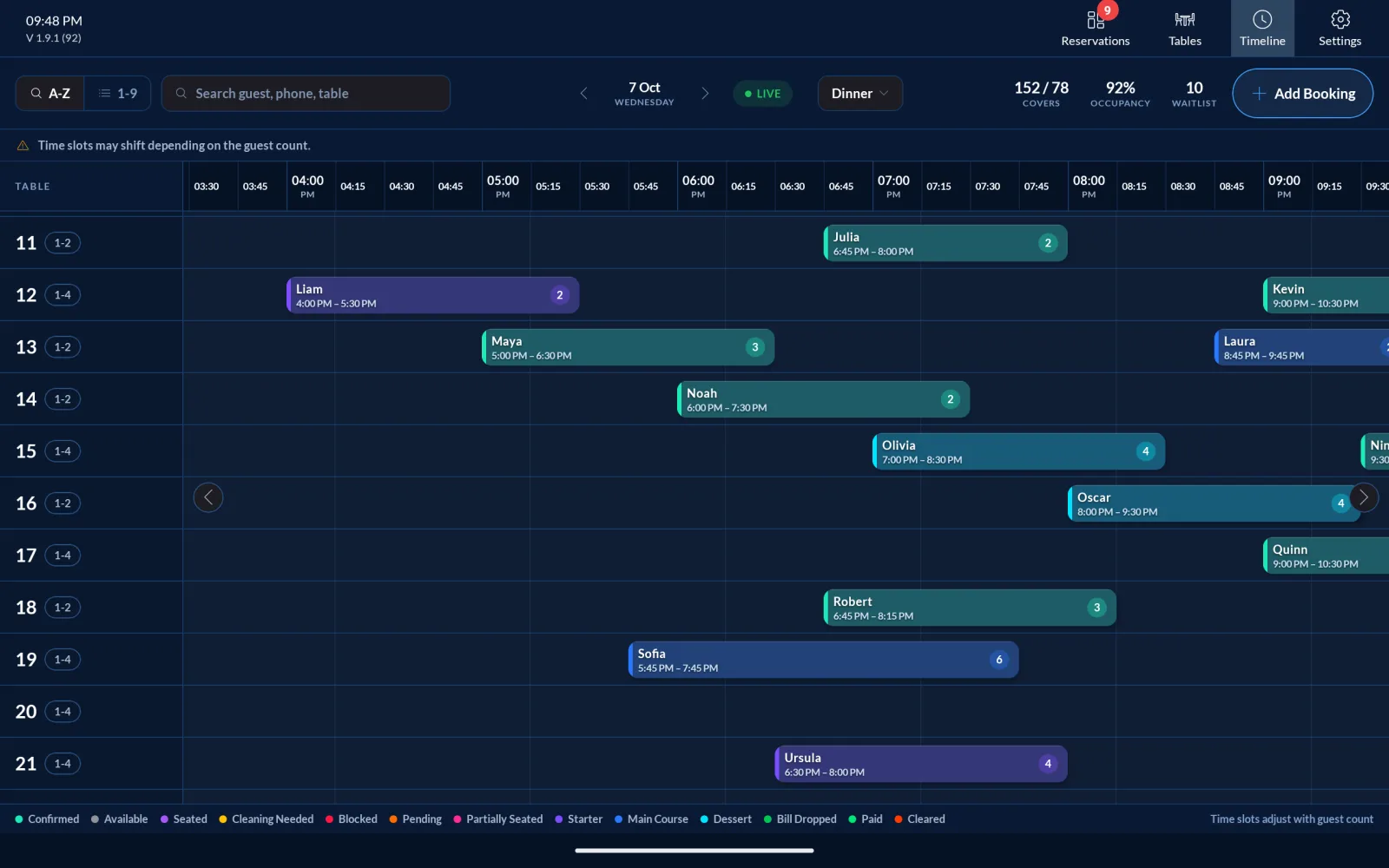
Table timeline

Find the gaps in your service

See bookings by table across the dinner service to avoid clashes and keep turnover moving.

  • Bookings laid out by table and timeRead the whole evening on one timeline.
  • Find gaps for extra coversSpot the windows where another party could fit.
  • EPOS-integrated real-time syncingYour floor and your till stay in step.
Res Hub timeline showing bookings by table across the dinner service

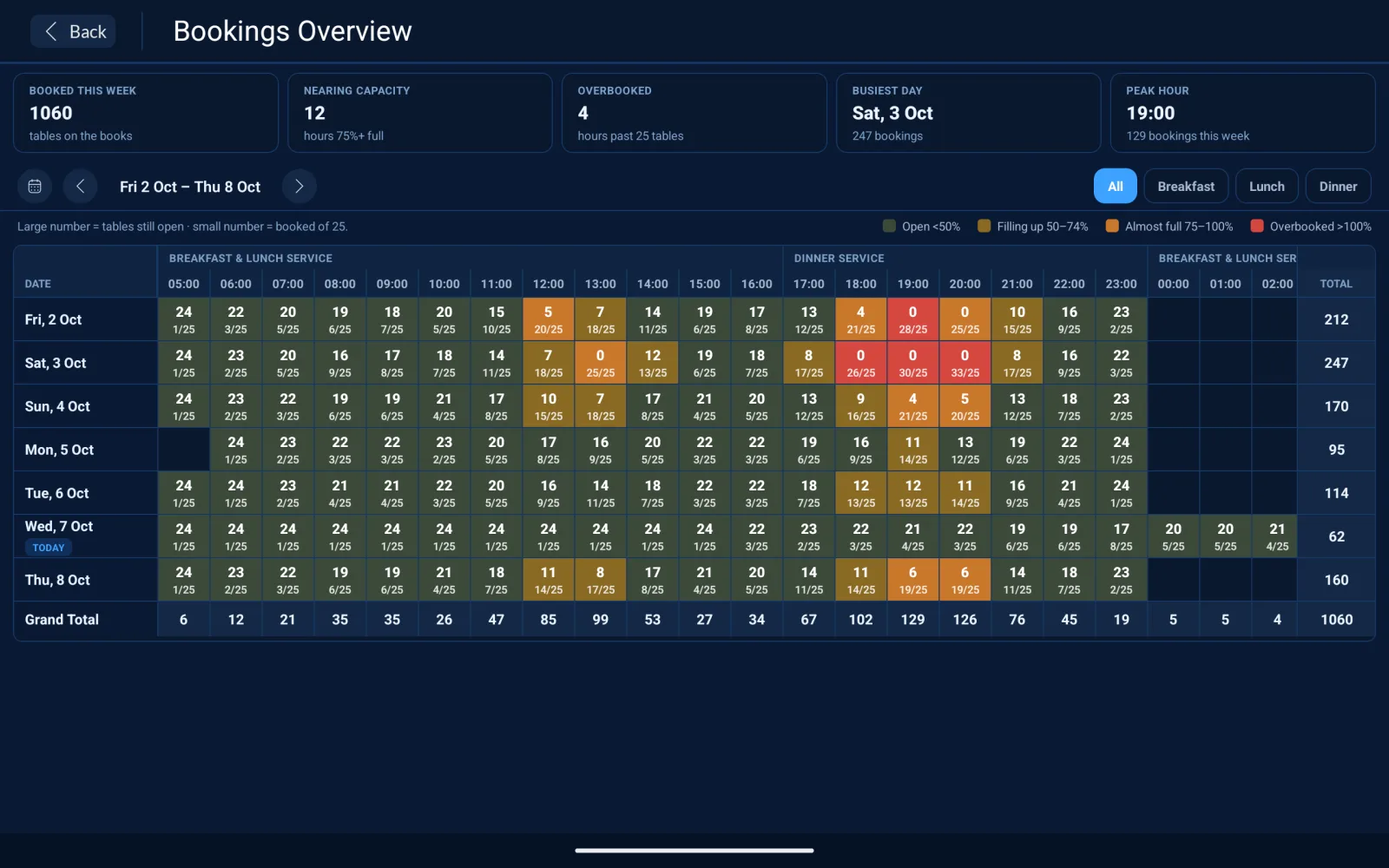
Bookings overview

Know what's working and what's not

A heat map of weekly demand by hour, so you can track peak times, cancellations and trends.

  • Weekly demand by hourSee exactly when the restaurant fills up.
  • Occupancy and cancellation trendsTrack how bookings and cancellations move over time.
  • Data to back staffing decisionsMake operational calls from real numbers.
Res Hub bookings overview heat map showing weekly demand by hour

You have built a great restaurant. We help you take the next big step.

Fill more tables

Suggested tables, a live floor plan and a smart waitlist keep every seat working through the busiest service.

Cut no-shows

Take deposits on bookings, approve requests in one tap and see at a glance who has already paid.

Run service smoothly

One shared view for the whole team, synced in real time across iPad, tablet and phone.

Trusted by the most-loved restaurants near you

  • Papa Johns
  • Subway
  • Craving Kebabs
  • Pepe's piri piri
  • Kebab Hut
  • TGI Friday
  • Little Dessert Shop

What restaurants ask about Res Hub

Res Hub works across iOS, Android, iPads and tablets, with live updates synced between every device on your floor.
Yes. You can set per-cover dundefinedits, send Pay by Link to collect them, and see which guests have already paid on every booking request.
Add walk-ins to the waitlist with a quoted wait time and a suggested table, or let guests join themselves by scanning your waitlist QR code.
Yes. Add the Res Hub reservation widget to your website, choose a tall or wide layout, match your brand colours and copy the embed code.
Res Hub supports POS-integrated real-time syncing so your floor and your till stay in step. Book a free demo and we will confirm the setup for your venue.

Guarantee success for your restaurant

Free demo. No commitment. See Res Hub on a real floor plan.